Choosing a Protective Laptop Sleeve in 2026 requires more than checking its color, logo, or advertised thickness. Modern laptops are lighter, thinner, and often more expensive, while daily travel exposes them to crowded trains, desk edges, coffee spills, and sudden drops. A reliable sleeve must balance impact protection, portability, fit, ventilation, and material quality.
Technology journalist and laptop-accessories specialist Andrew Cunningham has often emphasized a practical principle: “Protection only matters when it matches the way you actually carry your device.” That idea deserves attention. A sleeve that survives a controlled drop may still fail inside a loose backpack. Conversely, excessive padding can make a compact laptop awkward to store. The right Protective Laptop Sleeve should hold the computer firmly without squeezing its corners or blocking its ports.
Look closely at the details. Dense foam should cover the base and edges. A soft lining should prevent fine scratches. A strong zipper needs a covered track, especially near aluminum surfaces. Water resistance helps during light rain, but it does not make the sleeve waterproof. That distinction is easy to miss.
Real use can be imperfect. A sleeve may feel sturdy in a showroom, then collect dust around its zipper after one week. Some attractive fabrics also stain quickly. This guide examines those weaknesses, compares practical materials, and explains how to choose protection that suits your laptop, commute, workspace, and budget. The safest choice is rarely the thickest one.
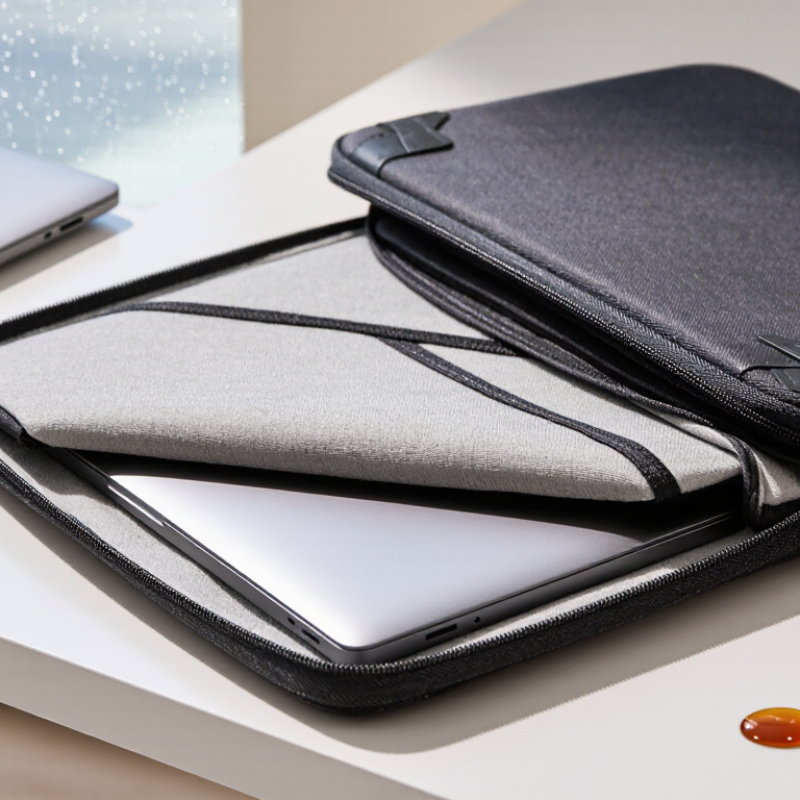
Choosing a protective laptop sleeve starts with accurate measurements, not screen size alone. I measure width, depth, and thickness with the charger removed. A 14-inch laptop can differ noticeably in body shape. Rounded corners, rear vents, and a raised hinge need extra room. I once selected a sleeve by screen size only. It fit poorly and pressed against the zipper. That mistake changed my fitting routine.
Check the laptop’s actual dimensions against the sleeve’s internal measurements. Leave a small clearance, but avoid a loose interior. Excess movement can create impact points during travel. A soft lining should cover the corners fully. Dense padding matters most along the base and edges. Consider your carrying habits, too. A backpack needs a slim sleeve that slides smoothly. A tote may need stronger structure and a secure handle. If you carry documents, test the sleeve with them. Bulk appears quickly. Thicker protection adds weight, and daily comfort may matter more than maximum padding.
Tips: Place the laptop inside before buying, if possible. Check whether ports remain accessible without forcing the device. Test the zipper around every corner. Walk with it for ten minutes. Notice shifting, pressure, and awkward handles. For frequent commuters, choose water-resistant fabric and a dependable closure. For occasional home use, lighter padding may be enough. Recheck measurements after buying a stand or case. Accessories can change the fit.
How to Choose a Protective Laptop Sleeve in 2026?
Material choice affects comfort, durability, and everyday protection. Neoprene is flexible, lightweight, and often resists small splashes. Woven polyester usually offers stronger abrasion resistance and keeps its shape better. A rigid outer panel can protect against pressure, but it may add bulk. Check the fabric closely. Loose stitching can fail before the material does.
Padding should absorb impact without making the sleeve difficult to carry. Dense foam protects better than thin, soft padding, especially around corners and edges. Some sleeves use layered padding, combining a firm outer layer with a softer inner lining. Test the corners. They often receive the hardest knocks. A smooth fleece lining can reduce scratches, but it should not collect excessive dust.
Protective features deserve practical testing. A raised zipper track can keep metal away from the laptop surface. Water-resistant fabric helps during light rain, but it is not the same as waterproof construction. A secure closure prevents accidental slipping, while a snug fit limits movement inside the sleeve. It should not slide. Measure the laptop, including its thickness and any attached accessories. My own mistake was choosing extra space for convenience; the computer moved too much during travel. A tighter fit would have been safer, although extremely tight sleeves can strain ports and corners. Consider handles, reinforced seams, and a washable lining when daily use is expected.
Comparing common sleeve materials, padding thickness, and protective features
Choosing a protective laptop sleeve starts with fit, not appearance. Measure the device, including its feet and unusual corners. A close fit prevents sliding during travel. However, the sleeve should not squeeze the lid or press against ports. Too much space allows impact movement. Too little space creates pressure.
I once chose a sleeve by matching its listed screen size. It looked suitable, but the laptop barely entered. That mistake taught me to compare internal dimensions carefully. Closure design matters as well. A smooth zipper can provide dependable security around books and cables. Magnetic closures feel convenient, but weak magnets may open inside a crowded bag. Hook-and-loop closures are practical, though they can catch fabric. Test it.
Inside, look for soft, non-abrasive lining and padding that covers the corners. A thin center pad may protect against scratches but offer little impact control. Raised edges can reduce contact when the sleeve is placed on a desk. An accessory pocket is useful, yet it should not press hard against the laptop. I prefer separate storage for chargers because metal plugs can leave small dents. Still, no sleeve can replace careful handling. I sometimes carry too many items together, which weakens even a well-designed sleeve. Wet weather also deserves attention: water resistance helps, but it does not make the sleeve waterproof.
How to Choose a Protective Laptop Sleeve in 2026?
Evaluate Weight, Portability, Water Resistance, and Durability
Weight matters. A protective sleeve should guard your laptop without becoming another heavy item. In daily use, a 400-gram sleeve can feel noticeable inside a crowded backpack. Check the sleeve’s empty weight and internal dimensions before buying. It should fit closely, but not squeeze the corners. A loose fit may allow the laptop to slide during travel. Handles, smooth zippers, and a slim profile also improve portability. I prefer a sleeve that opens widely on a train table or airport bench.
Water resistance needs careful inspection. A water-resistant outer fabric may protect against light rain, but it is not waterproof. Look for sealed or covered zippers and a soft, raised edge around the opening. Test it with a few drops, not a full soak. Water can still enter through seams. Avoid placing the sleeve directly on wet floors. Small habits matter.
Durability depends on more than thick padding. Dense foam, reinforced stitching, and abrasion-resistant fabric usually support longer use. Check the corners first, because they often hit desks and door frames. Pull the zipper gently several times. Examine loose threads and weak seams. Not always perfect. My own testing sometimes favors protection over comfort, which can make a sleeve awkward to carry. Reconsider that trade-off before choosing. A durable design should survive repeated commuting, yet remain practical enough for everyday movement.
| Sleeve Profile | Typical Weight | Portability | Water Resistance | Impact Protection | Durability | Useful Features | Best Use |
|---|---|---|---|---|---|---|---|
| Ultralight Stretch Neoprene | 150–250 g | ★★★★★ Very easy to carry |
Resists light splashes; fabric and seams are usually not fully waterproof | ★★☆☆☆ Basic scratch and minor-bump protection |
★★★☆☆ Flexible and resistant to small abrasions |
Low bulk, stretch fit, easy insertion into a backpack | Office commuting and protective storage inside another bag |
| Padded Polyester Sleeve | 250–450 g | ★★★★☆ Light enough for daily travel |
Usually handles light rain and accidental splashes when the zipper is closed | ★★★☆☆ Foam padding helps absorb minor knocks |
★★★☆☆ Good general-purpose wear resistance |
Soft lining, padded walls, common accessory pocket | Everyday commuting and campus use |
| Recycled-Fabric Padded Sleeve | 280–500 g | ★★★★☆ Moderate weight and compact profile |
Depends on coating; often splash-resistant rather than waterproof | ★★★☆☆ Protection varies with padding density |
★★★☆☆ Woven fabric offers useful abrasion resistance |
Recycled textile construction, padded interior, exterior storage | Routine travel where balanced protection and lower material impact matter |
| Coated Nylon Weather-Resistant Sleeve | 300–550 g | ★★★★☆ Portable with moderate structure |
Strong splash and rain resistance; zipper and seams remain potential entry points | ★★★☆☆ Good padding if the interior uses foam panels |
★★★★☆ Coated nylon generally resists abrasion and moisture well |
Water-repellent coating, sealed or covered zipper, reinforced corners | Outdoor commuting and variable-weather travel |
| Structured EVA Protective Sleeve | 450–750 g | ★★★☆☆ More rigid and less compressible |
Shell can shed water, but closures and seams still require attention | ★★★★☆ Rigid panels help distribute localized impact |
★★★★☆ Maintains shape and protects against compression |
Formed shell, reinforced edges, firm handle or secure closure | Frequent travel when the laptop may be pressed inside luggage |
| Rugged Multi-Layer Sleeve | 550–900 g | ★★☆☆☆ Heavier and bulkier than soft sleeves |
Often offers strong rain resistance; verify whether seams and zippers are sealed | ★★★★★ Multiple foam layers and reinforced edges provide the highest protection |
★★★★★ Designed for repeated handling and rougher environments |
Dense padding, corner protection, durable fabric, reinforced stitching | Field work, air travel, and demanding daily conditions |
Selection tip: choose the lightest sleeve that provides sufficient protection for your routine. For wet conditions, look for a water-resistant outer fabric plus a covered or sealed closure; water-resistant does not automatically mean fully waterproof.
How to Choose a Protective Laptop Sleeve in 2026?
A reliable sleeve should fit your laptop by measured dimensions, not by screen size alone. Measure the device’s length, width, and thickness, including rubber feet or a protective case. The interior should hold the laptop firmly without pressing against ports. I once chose a sleeve with generous space, but the computer slid during travel. That small gap reduced its protection. Check corner padding, seam strength, zipper clearance, and water-resistant fabric. Safety claims deserve careful reading. Look for published test methods, material details, and impact or abrasion results. No single standard proves complete protection.
Tips: Place your laptop inside and gently shake the sleeve. It should stay centered. Check whether the zipper touches the device. Test the handle with a loaded bag. Small details matter.
Price should reflect construction, not just appearance. Dense foam, reinforced stitching, and a soft lining usually support longer use. However, a higher price does not guarantee better protection. Compare padding thickness, warranty terms, repair options, and replacement availability. A sleeve used daily may face dust, coffee drops, crowded trains, and repeated bending. I prefer a simple design with washable surfaces and strong stitching. Still, I sometimes overvalue extra pockets that add bulk. Consider your routine honestly. A lighter sleeve may serve better if you carry the laptop between meetings. A cheaper sleeve may cost more after a torn seam forces replacement.
Measure length, width, and thickness. Include rubber feet, unusual corners, and any protective case. Screen size alone can mislead.
The laptop should stay centered without pressure. Too much space allows movement during travel. Too little space may press against ports.
Place the laptop inside and gently shake the sleeve. It should remain steady. Check that the zipper does not touch the device.
A smooth zipper gives dependable closure around books and cables. Magnetic closures feel quick but may open in a crowded bag. Hook-and-loop closures work, though they can catch fabric.
Choose soft, non-abrasive lining and padding around the corners. Raised edges can reduce desk contact. A thin center pad may protect from scratches, not hard impacts.
Not always. A pocket should not press against the laptop. Store chargers separately when possible. Metal plugs can leave small dents.
No. Water resistance helps with light moisture, not heavy rain. Keep the sleeve away from puddles and wet bags.
No. Compare foam density, stitching, lining, warranty terms, and repair options. A high price can still hide weak construction.
Consider dust, coffee drops, crowded trains, and repeated bending. A washable surface and strong stitching may matter more than extra pockets.
No sleeve can prevent every problem. I sometimes carry too many items together, which reduces protection. Careless packing remains a weakness.
Choosing the right Protective Laptop Sleeve begins with understanding your laptop’s exact dimensions, shape, and the way you carry it. Measure the device carefully and consider whether you need extra room for a charger, documents, or accessories. Compare materials and padding levels to find a balance between shock absorption, scratch prevention, and everyday flexibility. A reliable fit should hold the laptop securely without creating excessive pressure, while a dependable closure and soft interior help prevent movement and surface damage.
You should also evaluate the sleeve’s weight, portability, water resistance, and overall durability. A lightweight design is convenient for daily travel, but it should still provide enough protection for common bumps and changing conditions. Before purchasing, confirm compatibility with your laptop model, inspect the construction and safety features, and compare the price with the product’s expected lifespan. The best choice offers practical protection, comfortable carrying, and lasting value without unnecessary bulk.